

PostgreSQL Shared Buffers & Linux Page Cache Interaction: The Hidden Layer of Memory Management
Comprehensive architectural guide on how PostgreSQL shared_buffers and Linux OS page cache interact, buffered I/O execution pipeline, double caching mechanics, cache hit ratio realities, and dual-layer tuning.
PostgreSQL Shared Buffers & Linux Page Cache Interaction: The Hidden Layer of Memory Management
Category: PostgreSQL → Performance Tuning → Memory Management Technical Level: Intermediate / Advanced Reading Time: 18–22 minutes
1. Introduction: Where Does PostgreSQL Really Cache Data?
In PostgreSQL performance tuning, shared_buffers is among the most frequently debated parameters.
When setting up a new PostgreSQL server, administrators typically encounter this baseline guideline:
While this recommendation serves as a sensible starting point for many systems, adjusting this single setting without understanding PostgreSQL's broader memory architecture often yields disappointing results.
PostgreSQL does not rely on a single caching mechanism for database pages.
In a standard Linux buffered I/O execution path, two distinct caching tiers operate:
- 1PostgreSQL Shared Buffers: The shared memory pool managed directly by the database engine.
- 2Linux Page Cache: The kernel-level filesystem cache holding file contents in physical memory.
Although managed independently, these two tiers jointly determine database throughput and I/O latency.
When PostgreSQL fails to find a required block in Shared Buffers, it does not necessarily trigger an expensive physical disk read.
The requested block may already reside in the Linux Page Cache.
This distinction is central to accurate PostgreSQL performance diagnosis.
In this deep dive, we examine:
- •How PostgreSQL Shared Buffers and the Linux Page Cache operate together.
- •The exact layers traversed when executing an SQL query.
- •Whether the same data block can reside in both memory tiers simultaneously (*double caching*).
- •Why increasing Shared Buffers does not always improve performance.
- •Why the PostgreSQL buffer cache hit ratio is misleading on its own.
- •Practical techniques for observing Linux Page Cache behavior.
- •How to determine the ideal memory allocation for production workloads.
2. PostgreSQL Memory Architecture Overview
PostgreSQL memory consumption extends far beyond shared_buffers.
Total server memory is divided across several distinct components:
| Memory Component | Purpose |
|---|---|
| Shared Buffers | Caches database table and index pages |
| WAL Buffers | Temporarily holds WAL records prior to disk flush |
| Work Memory | Dedicated sort, hash join, and aggregation memory per operation |
| Maintenance Work Memory | Dedicated memory for VACUUM, CREATE INDEX, and ALTER TABLE operations |
| Backend Private Memory | Per-connection process heaps and execution context |
| Linux Page Cache | OS kernel cache for filesystem blocks |
Shared Buffers is directly controlled by PostgreSQL processes.
The Linux Page Cache, by contrast, is an operating system mechanism shared across all active processes on the host.
A healthy configuration requires balancing the memory dedicated exclusively to PostgreSQL against the memory left available for kernel caching.
▸2.1 What is Shared Buffers?
Shared Buffers is the fixed-size shared memory segment where PostgreSQL keeps active 8 KB database pages.
For example:
shared_buffers = 8GBWith standard 8 KB pages, this reserves room for approximately 1,048,576 buffer slots.
Any backend process can access pages residing in Shared Buffers, avoiding redundant filesystem calls.
PostgreSQL manages buffer eviction using a clock-sweep replacement algorithm that tracks page usage counts.
In addition, bulk sequential scans and maintenance routines employ dedicated buffer access strategies (ring buffers) to prevent large scans from evicting hot working sets.
▸2.2 What is the Linux Page Cache?
The Linux Page Cache stores page-sized (typically 4 KB) chunks of regular files in unused RAM.
Under standard buffered I/O, when an application requests file data, the kernel first inspects the Page Cache.
If present (cache hit), the read completes in RAM with zero disk head movement or NVMe controller interaction.
If absent (cache miss), the kernel fetches the missing pages from physical storage and places them into the Page Cache.
Under memory pressure, Linux automatically reclaims clean page cache pages, writing dirty pages out as necessary.
Therefore, viewing memory occupied by Linux cache as "wasted" or unavailable is a fundamental operational misconception.
3. What Happens When a PostgreSQL Query Executes?
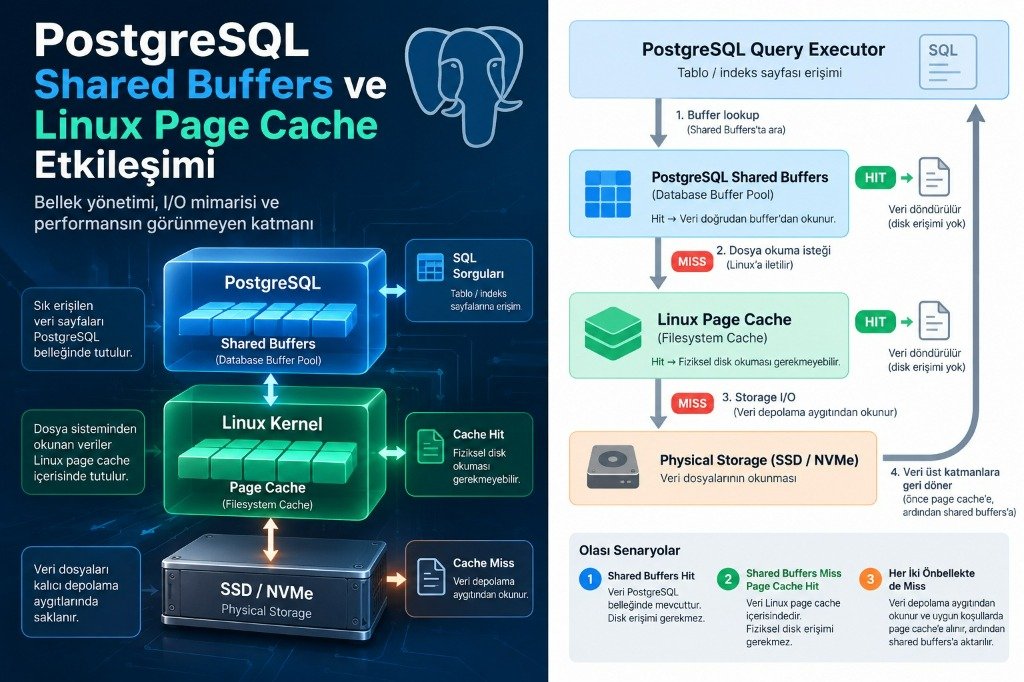
Consider a simple point lookup:
SELECT *
FROM orders
WHERE order_id = 10001;
Assuming PostgreSQL must access the relevant table or index page:
▸Scenario A: Shared Buffers Hit
PostgreSQL discovers the target page already cached in Shared Buffers.
No filesystem read is requested.
This is recorded in database statistics as a buffer hit.
▸Scenario B: Shared Buffers Miss, Linux Page Cache Hit
The requested block is absent from Shared Buffers.
PostgreSQL issues a read system call to the operating system.
However, the file pages are already resident in the Linux Page Cache.
The kernel fulfills the request directly from memory without issuing physical NVMe/SSD storage I/O.
From PostgreSQL's perspective, a buffer read occurred; yet physically, no disk I/O took place.
▸Scenario C: Miss in Both Caches
The block is absent from both Shared Buffers and the Linux Page Cache.
The operating system issues I/O commands to physical storage.
Data is loaded into the Page Cache and copied into PostgreSQL's buffer pool slot.
Each scenario has drastically different latency characteristics.
Scenario B explains why high read counts in PostgreSQL do not automatically correlate with saturated storage controllers.
4. Double Caching: Can the Same Data Reside in Memory Twice?
Yes.
Because PostgreSQL uses standard buffered I/O, a single 8 KB table page may exist simultaneously in Shared Buffers and in the Linux Page Cache.
This phenomenon is commonly known as *double caching*.
▸4.1 Is Double Caching Inherently Bad?
No.
While duplicating data might seem wasteful, each cache layer fulfills a different role:
- •Shared Buffers gives PostgreSQL pin/lock primitives, transaction visibility awareness, and clock-sweep eviction tuned for relational access.
- •Linux Page Cache handles kernel readahead, device-level write coalescing, and host-wide memory reclamation.
The goal is not to eliminate double caching entirely, but to strike an equilibrium where both layers operate efficiently.
▸4.2 What Happens If Shared Buffers Is Sized Too Large?
Allocating excessive RAM to Shared Buffers starves the Linux Page Cache and limits per-query work_mem.
Potential risks include:
- •Severely diminished OS cache capacity for unbuffered file access.
- •Heightened risk of host memory exhaustion, OOM kills, and swapping.
- •Larger checkpoint spikes and heavier writeback pressure during dirty buffer flushes.
- •Unpredictable query latency degradation under mixed workloads.
5. Why Does the 25% Rule Exist?
Official PostgreSQL documentation recommends 25% of system RAM as an initial baseline because PostgreSQL intentionally relies on the underlying OS cache.
Allocating more than 40% of RAM rarely yields linear throughput improvements and often degrades mixed analytical/reporting workloads.
▸5.1 Sample Allocation on a 64 GB Host
| Shared Buffers | RAM Percentage | Remaining Theoretical RAM |
|---|---|---|
| 8 GB | 12.5% | 56 GB |
| 16 GB | 25.0% | 48 GB |
| 24 GB | 37.5% | 40 GB |
| 32 GB | 50.0% | 32 GB |
The remaining memory accommodates backend connection heaps, sorting/hash memory (work_mem), autovacuum workers, and the kernel Page Cache.
6. Why Cache Hit Ratio Can Be Misleading
Administrators often monitor database-level cache hit ratio:
SELECT
    datname,
    blks_hit,
    blks_read,
    ROUND(
        100.0 * blks_hit /
        NULLIF(blks_hit + blks_read, 0),
        2
    ) AS cache_hit_ratio
FROM pg_stat_database
WHERE datname IS NOT NULL;
A high ratio (e.g. 99%) in OLTP databases indicates healthy buffer reuse.
However, an 80% hit ratio in an analytics database does not mean 20% of reads hit physical disks; the vast majority are likely served by the Linux Page Cache in microseconds.
▸6.2 Inspecting Buffer Usage with EXPLAIN (BUFFERS)
EXPLAIN (ANALYZE, BUFFERS)
SELECT *
FROM orders
WHERE order_date >= DATE '2026-01-01';
Output snippet:
Buffers: shared hit=8500 read=1500Here, read=1500 signifies 1,500 blocks fetched via OS read calls, not 1,500 physical NVMe transactions.
7. Dual-Tier Telemetry & Monitoring
▸7.1 Key PostgreSQL Parameters
SHOW shared_buffers;
SHOW effective_cache_size;
SHOW work_mem;
SHOW maintenance_work_mem;
SHOW track_io_timing;
Note: effective_cache_size does not allocate memory; it informs planner cost estimates for index scans versus sequential scans.
▸7.2 Linux Memory & Swap Telemetry
free -h
cat /proc/meminfo
vmstat 1
Track MemAvailable, Cached, Dirty, and swap in/out (si/so).
▸7.3 PostgreSQL 16+ pg_stat_io
SELECT
    backend_type,
    object,
    context,
    reads,
    hits,
    evictions,
    writes,
    fsyncs
FROM pg_stat_io
WHERE object = 'relation'
ORDER BY reads DESC NULLS LAST;
8. Real-World Case Study: Why Sizing Up Shared Buffers Degraded Performance
A production 64 GB NVMe server hosting 500 GB mixed OLTP/reporting was resized from 16 GB to 32 GB Shared Buffers.
Reporting queries slowed noticeably because large scans that previously benefited from kernel readahead and generous Page Cache suffered from squeezed memory and increased dirty buffer eviction pressure.
9. Practical Step-by-Step Optimization Roadmap
- 1Classify Workloads: OLTP benefits heavily from Shared Buffers; analytical queries rely more on kernel readahead and ring buffers.
- 2Calculate Total Budget: Account for
max_connections * work_mem, autovacuum, OS kernel, and Page Cache. - 3Establish Baseline: Start with 25% of RAM.
- 4Benchmark Incrementally: Test 15%, 25%, and 35% with realistic query mixes under concurrency.
- 5Measure Real User Latency: Focus on p95/p99 query durations rather than raw cache hit ratios alone.
10. Common Pitfalls
- •Pitfall 1: Maximizing Shared Buffers blindly.
- •Pitfall 2: Equating
blks_readwith physical disk I/O. - •Pitfall 3: Treating Linux cached RAM as unusable memory.
- •Pitfall 4: Believing
effective_cache_sizeallocates memory. - •Pitfall 5: Dropping kernel caches in production with
drop_caches. - •Pitfall 6: Overlooking checkpoint spread and writeback spikes.
11. DBA Diagnostic Checklist
- Is Shared Buffers proportional to RAM and current query profile?
- How does PostgreSQL cache hit ratio trend over time?
- Does
pg_stat_ioshow abnormal eviction rates? - Is Linux
MemAvailablehealthy without swap activity? - What are the physical storage IOPS and read/write latencies?
- Do checkpoint spikes induce query latency jitter?
- Is
effective_cache_sizerealistically tuned?
12. Conclusion: Memory Management is a Two-Tier Architecture
PostgreSQL performance depends as much on the Linux kernel Page Cache as it does on the internal database buffer pool.
Rather than maximizing Shared Buffers in isolation, DBAs must cultivate a balanced dual-tier architecture tailored to the host's actual workload.
References
Did increasing shared_buffers always improve performance in your PostgreSQL environment?
Share your observations regarding Linux Page Cache sizing, checkpoint spikes, and memory balancing across high-RAM PostgreSQL workloads.
PostgreSQL WAL Architecture, Full Page Writes & Checkpoint Spreading Optimization
Comprehensive technical guide on PostgreSQL WAL architecture, Full Page Writes (FPW), checkpoint spreading via checkpoint_completion_target, and high-write tuning.
PostgreSQL Autovacuum Tuning & XID Wraparound: Preventing the 2-Billion Transaction ID Crisis
Comprehensive architectural guide on PostgreSQL Autovacuum internals, 32-bit transaction ID (XID) aging, tuple freezing, anti-wraparound vacuum mechanics, production capacity planning, and incident runbooks.